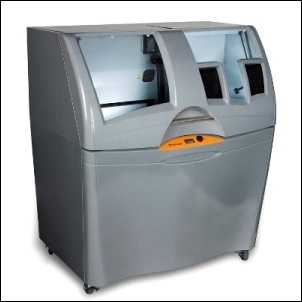
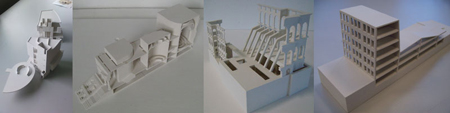
The zCorp z450 3D printer is a rapid-prototyping device that transforms electronic 3D data into handheld physical models. It manufactures models by successively placing layers of a plaster based powder a few thousands of a millimetre thick, jetting the layers with binder solution, and building up the three dimensional object layer by layer.
File Formats
Files for 3D printing may be prepared in any 3D modeling program that can export in a 3DS file format – e.g. 3D Studio Max, AutoCAD, Sketchup Pro – then brought into Z Corporation’s proprietary software; “zPrint”. This software allows you to view and size your model before printing, to estimate how long it will take to print and how much powder it will use – FILE – PRINT TIME ESTIMATOR This software is installed on all the PCs in the 2nd floor computer studios but it is for preparation purposes only – it only the machine next to the 3D printer itself can actually send jobs to it. Maximum model size that can be printed is 200mm x 200mm x 250mm (8 x 8 x 10 inches)
Costing
Cost is based on the amount of powder required for the print; this is currently set at £2.50 / cubic inch. Some real world examples of this
- Print a solid cube to the maximum possible dimension of 200x200x250: Printer requires 442.84 Cubic Inches of powder: £1107.1 – Print time of 28 Hours
- Pack of cigarettes: 90 x 60 x 30mm: Printer requires 9.89 Cubic Inches of powder: £24.73 – Print time of 1 Hour 10 minutes
- Can of Coke – solid: height 121 x diameter 66: Printer requires 24.5 Cubic Inches of powder: £61.25 – Print time of 2 hours and 48 minutes
- Can of Coke – shelled out: 3mm thickness: Printer requires 4.8 Cubic Inches of powder: £12.00 – Print time of 2 hours and 8 minutes
Note: you can significantly reduce the amount of powder used in a model by avoiding totally solid models – hollow out beforehand (in 3DS boolean subtract a solid cylinder from a shape, in Sketchup Push Pull a hole in the object). Care must be taken avoid the model does not become up egg shell thin though, as it is likely to break easily. 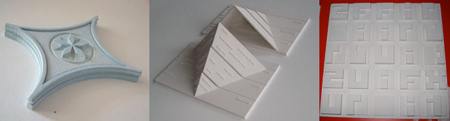
Printing
You need to save your prepared zPrint file and bring it to the studio for evaluation – if it has not come into zPrint properly, or if it is too impractical to print then we may refuse it. For example, a big heavy block on top of a few cocktail-stick thin columns would just fall apart.
Prints are sent late in the afternoon and left running overnight. When the printer is finished then the model has to be vacuumed and dusted – which can also take a lot of time, depending on the model’s complexity. Additionally the printer may busy so you may have to wait for a slot. Please don’t assume that it is just like a laser printer where you can get immediate results – prepare your model well and give yourself plenty of time.